
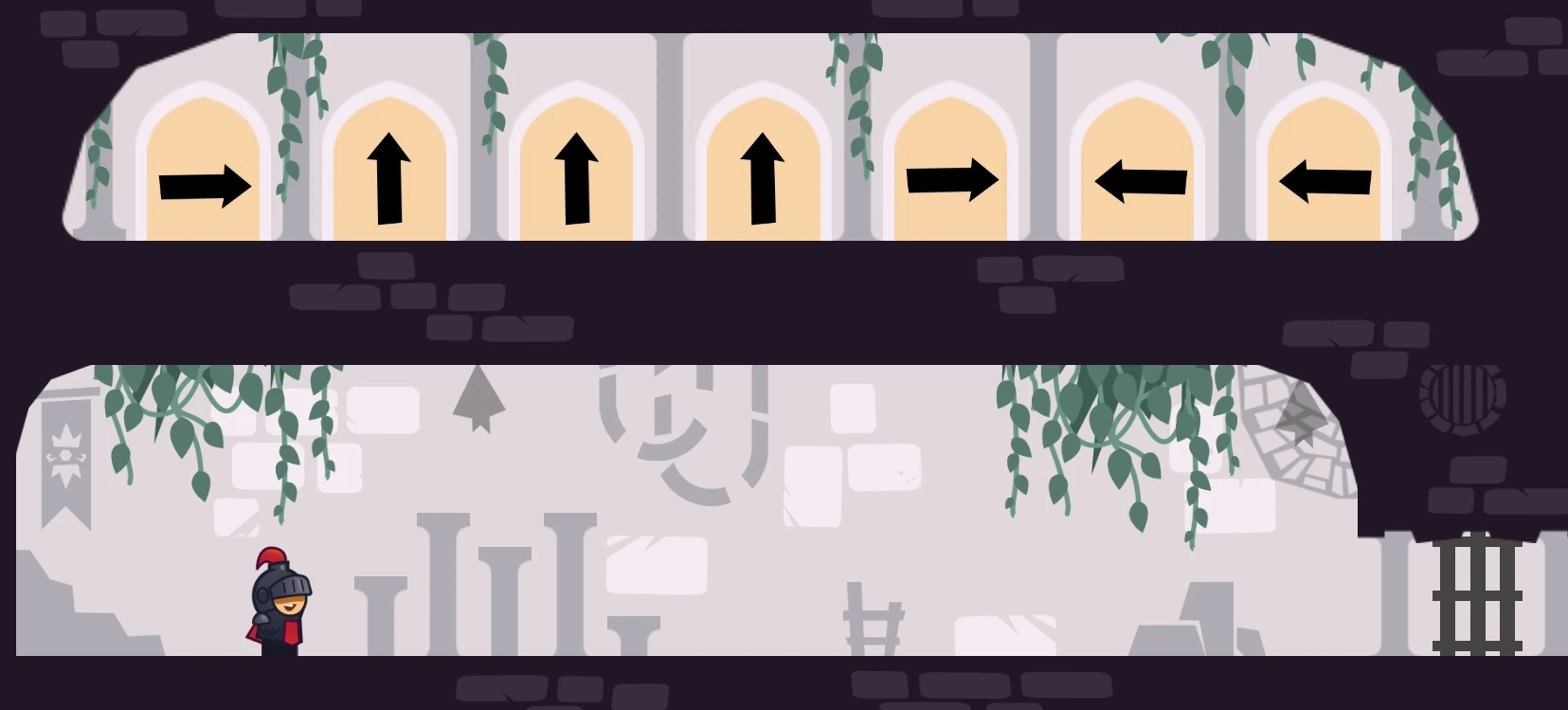
Tricky Castle room numbers can change between Android and iOS releases. Before following this Tricky Castle Level 49 guide, match the gameplay screenshot, room layout and puzzle clue to your version.
Tricky Castle Level 49 walkthroughs & guide
Below is a comprehensive walkthrough for Tricky Castle Level 49, covering the complete route from the opening position to the exit. The main challenge in Tricky Castle Level 49 is learning how to follow the arrow command sequence exactly while avoiding the trick built into the room. Follow the steps in order, check the visible response after each action and use the screenshot above to confirm that you are on the same version of the level.
Tricky Castle Level 49 quick answer: Read the seven symbols above the room and perform right, jump, jump, jump, right, left, left to unlock the gate.
Step 1. Read the seven arrows from left to right
In Tricky Castle Level 49, the icons above the chamber are an input code rather than navigation signs. Translate the horizontal arrows into movement presses and the three upward arrows into jumps. The full Tricky Castle Level 49 sequence is right, jump, jump, jump, right, left, left.
Step 2. Enter the first five commands cleanly
In Tricky Castle Level 49, press right once, then make three distinct jumps and press right once more. Let each jump register separately rather than holding the button, because the puzzle counts actions. Avoid extra direction corrections during the code; even a harmless tap can break the expected order and force a restart.
Step 3. Finish with two left presses and enter the gate
In Tricky Castle Level 49, press left twice as the final commands. The gate on the right responds when all seven inputs match. After it opens, cross the room and enter the exit. If nothing changes, begin the entire sequence again from the first right press without adding movement between symbols.
Notes and Precautions
- 1. The arrows describe controller inputs, not doors to choose, and they must be read from left to right.
- 2. Three separate jump presses are required in the middle.
- 3. The exact sequence ends with two left commands.
- 4. Additional movement can invalidate the code and require a clean restart from the first arrow.
Tips and Tricks
- 1. Say the sequence aloud before starting.
- 2. Use brief taps rather than holding a direction.
- 3. Watch for the gate response after the second left press.
- 4. Restart from the first command if any extra input occurs.
Tricky Castle Level 49 collectibles and secrets
For Tricky Castle Level 49, the bats in Tricky Castle Level 49 sit along the normal room path. Collect them before or after entering the command sequence, but keep collectible movement separate from the seven counted inputs. The safest method is to gather the bats first, return to a stable position and then execute right, jump, jump, jump, right, left, left without interruption. Wait for the gate animation to complete before adding another direction press that might be interpreted as a new command.
By following these steps in sequence, you can finish Tricky Castle Level 49 without relying on random movement or unnecessary interactions. Remember that the defining puzzle in Tricky Castle Level 49 is to follow the arrow command sequence exactly. If your room looks different, compare the screenshot and video before retrying because your game version may use another level number.
Tricky Castle Level 49 walkthrough video
Tricky Castle Level 49 walkthrough by Brave Gameplay. The video opens directly on this level.
Tricky Castle Level 49 video walkthrough and solution
This Tricky Castle Level 49 walkthrough video shows the complete verified route from the opening position to the exit. Watch how the player handles the room’s main trick—follow the arrow command sequence exactly—then use the written checkpoints below if you need to repeat only one part of the solution. The dedicated Tricky Castle Level 49 video solution is especially useful for jump timing, moving hazards and interactions that are easier to recognize in motion.
Tricky Castle Level 49 video quick answer: Read the seven symbols above the room and perform right, jump, jump, jump, right, left, left to unlock the gate.
What to watch for in the Tricky Castle Level 49 walkthrough video
Before copying the movement, compare the room layout in the video with your game. Tricky Castle numbering can differ between Android and iOS builds, so the visual arrangement and puzzle clue are more reliable than the number alone. When the room matches, play the Tricky Castle Level 49 walkthrough video once at normal speed to understand the full idea, then replay the exact action that is causing trouble.
Video checkpoint 1: Read the seven arrows from left to right
At this point in the Tricky Castle Level 49 video walkthrough, the icons above the chamber are an input code rather than navigation signs. Translate the horizontal arrows into movement presses and the three upward arrows into jumps. The full Tricky Castle Level 49 sequence is right, jump, jump, jump, right, left, left. Watch the character, nearby hazards and any object that changes after the action; that visual response confirms that you can move to the next checkpoint.
Video checkpoint 2: Enter the first five commands cleanly
At this point in the Tricky Castle Level 49 video walkthrough, press right once, then make three distinct jumps and press right once more. Let each jump register separately rather than holding the button, because the puzzle counts actions. Avoid extra direction corrections during the code; even a harmless tap can break the expected order and force a restart. Watch the character, nearby hazards and any object that changes after the action; that visual response confirms that you can move to the next checkpoint.
Video checkpoint 3: Finish with two left presses and enter the gate
At this point in the Tricky Castle Level 49 video walkthrough, press left twice as the final commands. The gate on the right responds when all seven inputs match. After it opens, cross the room and enter the exit. If nothing changes, begin the entire sequence again from the first right press without adding movement between symbols. Watch the character, nearby hazards and any object that changes after the action; that visual response confirms that you can move to the next checkpoint.
Tricky Castle Level 49 video notes and precautions
The video route is a demonstration of one clean completion, not a signal to rush. Pause before any precise jump or timed interaction and compare the player’s starting position with yours. In Tricky Castle Level 49, a small difference in spacing can change when a trap activates.
- 1. The arrows describe controller inputs, not doors to choose, and they must be read from left to right.
- 2. Three separate jump presses are required in the middle.
- 3. The exact sequence ends with two left commands.
- 4. Additional movement can invalidate the code and require a clean restart from the first arrow.
Tips for following the Tricky Castle Level 49 video solution
- 1. Say the sequence aloud before starting.
- 2. Use brief taps rather than holding a direction.
- 3. Watch for the gate response after the second left press.
- 4. Restart from the first command if any extra input occurs.
Collectibles shown around Tricky Castle Level 49
After learning the escape route from the Tricky Castle Level 49 walkthrough video, replay the room for optional items if needed. the bats in Tricky Castle Level 49 sit along the normal room path. Collect them before or after entering the command sequence, but keep collectible movement separate from the seven counted inputs. The safest method is to gather the bats first, return to a stable position and then execute right, jump, jump, jump, right, left, left without interruption. Wait for the gate animation to complete before adding another direction press that might be interpreted as a new command. A separate collectible run is often safer than trying to combine every secret with the first successful exit.
Finish Tricky Castle Level 49 with the video
The important lesson in this Tricky Castle Level 49 video guide is to reproduce the order of actions, not merely the final movement. Confirm each switch, platform or hazard response before continuing. If your screen still does not match, return to the screenshot on the Cheats & Solution tab and locate the guide whose room layout matches your version.