
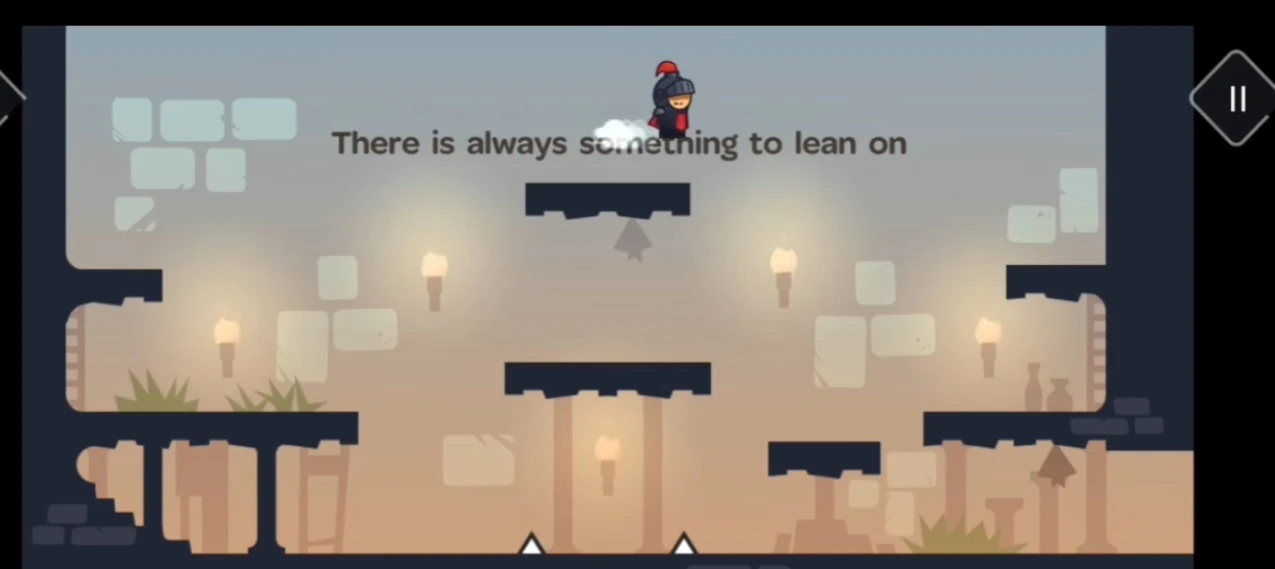
Tricky Castle room numbers can change between Android and iOS releases. Before following this Tricky Castle Level 16 guide, match the gameplay screenshot, room layout and puzzle clue to your version.
Tricky Castle Level 16 walkthroughs & guide
Below is a comprehensive walkthrough for Tricky Castle Level 16, covering the complete route from the opening position to the exit. The main challenge in Tricky Castle Level 16 is learning how to jump onto the clue text and use it as a bridge while avoiding the trick built into the room. Follow the steps in order, check the visible response after each action and use the screenshot above to confirm that you are on the same version of the level.
Tricky Castle Level 16 quick answer: Treat the sentence in the middle of the room as a solid platform, jump onto the letters and walk across them above the spikes.
Step 1. Move beneath the clue sentence
In Tricky Castle Level 16, walk toward the center while watching the text “There is always something to lean on.” The ordinary dark platforms do not form a continuous safe path and the spikes below make a blind jump risky. Position the knight directly below the left side of the sentence, treating the visible letters as part of the room rather than decoration.
Step 2. Jump onto the solid text
In Tricky Castle Level 16, jump upward until the knight lands on top of the letters. The sentence has collision and supports the character like a long hidden platform. Stabilize on the text before moving across it; falling between words can drop the knight back toward the lower hazards, so use short corrections instead of a long uncontrolled leap.
Step 3. Walk across the letters to the exit
In Tricky Castle Level 16, continue along the top of the sentence and use its full width to bypass the spikes. From the final letters, jump to the safe platform on the far side and follow the remaining route to the door. The clue’s word “lean” is literal: once the text is used as support, no hidden switch is required.
Notes and Precautions
- 1. The clue sentence is a physical surface even though it looks like ordinary interface text.
- 2. Approach the left side of the words from directly below for the easiest landing.
- 3. The text route avoids the spike floor and replaces an impossible series of jumps.
- 4. All bats can be collected without abandoning the safe route once the text bridge is known.
Tips and Tricks
- 1. Use a controlled vertical jump to test the first word.
- 2. Pause after landing so momentum does not carry the knight off the letters.
- 3. Walk across the sentence instead of jumping from word to word.
- 4. Use the far end of the text to line up the final platform jump.
Tricky Castle Level 16 collectibles and secrets
For Tricky Castle Level 16, all bats are inside the level. Check the safe platforms before and after the text bridge, then return to the letters if a collectible on the opposite side was missed.
By following these steps in sequence, you can finish Tricky Castle Level 16 without relying on random movement or unnecessary interactions. Remember that the defining puzzle in Tricky Castle Level 16 is to jump onto the clue text and use it as a bridge. If your room looks different, compare the screenshot and video before retrying because your game version may use another level number.
Tricky Castle Level 16 walkthrough video
Tricky Castle Level 16 walkthrough by Tricks And Solutions. The video opens directly on this level.
Tricky Castle Level 16 video walkthrough and solution
This Tricky Castle Level 16 walkthrough video shows the complete verified route from the opening position to the exit. Watch how the player handles the room’s main trick—jump onto the clue text and use it as a bridge—then use the written checkpoints below if you need to repeat only one part of the solution. The dedicated Tricky Castle Level 16 video solution is especially useful for jump timing, moving hazards and interactions that are easier to recognize in motion.
Tricky Castle Level 16 video quick answer: Treat the sentence in the middle of the room as a solid platform, jump onto the letters and walk across them above the spikes.
What to watch for in the Tricky Castle Level 16 walkthrough video
Before copying the movement, compare the room layout in the video with your game. Tricky Castle numbering can differ between Android and iOS builds, so the visual arrangement and puzzle clue are more reliable than the number alone. When the room matches, play the Tricky Castle Level 16 walkthrough video once at normal speed to understand the full idea, then replay the exact action that is causing trouble.
Video checkpoint 1: Move beneath the clue sentence
At this point in the Tricky Castle Level 16 video walkthrough, walk toward the center while watching the text “There is always something to lean on.” The ordinary dark platforms do not form a continuous safe path and the spikes below make a blind jump risky. Position the knight directly below the left side of the sentence, treating the visible letters as part of the room rather than decoration. Watch the character, nearby hazards and any object that changes after the action; that visual response confirms that you can move to the next checkpoint.
Video checkpoint 2: Jump onto the solid text
At this point in the Tricky Castle Level 16 video walkthrough, jump upward until the knight lands on top of the letters. The sentence has collision and supports the character like a long hidden platform. Stabilize on the text before moving across it; falling between words can drop the knight back toward the lower hazards, so use short corrections instead of a long uncontrolled leap. Watch the character, nearby hazards and any object that changes after the action; that visual response confirms that you can move to the next checkpoint.
Video checkpoint 3: Walk across the letters to the exit
At this point in the Tricky Castle Level 16 video walkthrough, continue along the top of the sentence and use its full width to bypass the spikes. From the final letters, jump to the safe platform on the far side and follow the remaining route to the door. The clue’s word “lean” is literal: once the text is used as support, no hidden switch is required. Watch the character, nearby hazards and any object that changes after the action; that visual response confirms that you can move to the next checkpoint.
Tricky Castle Level 16 video notes and precautions
The video route is a demonstration of one clean completion, not a signal to rush. Pause before any precise jump or timed interaction and compare the player’s starting position with yours. In Tricky Castle Level 16, a small difference in spacing can change when a trap activates.
- 1. The clue sentence is a physical surface even though it looks like ordinary interface text.
- 2. Approach the left side of the words from directly below for the easiest landing.
- 3. The text route avoids the spike floor and replaces an impossible series of jumps.
- 4. All bats can be collected without abandoning the safe route once the text bridge is known.
Tips for following the Tricky Castle Level 16 video solution
- 1. Use a controlled vertical jump to test the first word.
- 2. Pause after landing so momentum does not carry the knight off the letters.
- 3. Walk across the sentence instead of jumping from word to word.
- 4. Use the far end of the text to line up the final platform jump.
Collectibles shown around Tricky Castle Level 16
After learning the escape route from the Tricky Castle Level 16 walkthrough video, replay the room for optional items if needed. all bats are inside the level. Check the safe platforms before and after the text bridge, then return to the letters if a collectible on the opposite side was missed. A separate collectible run is often safer than trying to combine every secret with the first successful exit.
Finish Tricky Castle Level 16 with the video
The important lesson in this Tricky Castle Level 16 video guide is to reproduce the order of actions, not merely the final movement. Confirm each switch, platform or hazard response before continuing. If your screen still does not match, return to the screenshot on the Cheats & Solution tab and locate the guide whose room layout matches your version.