
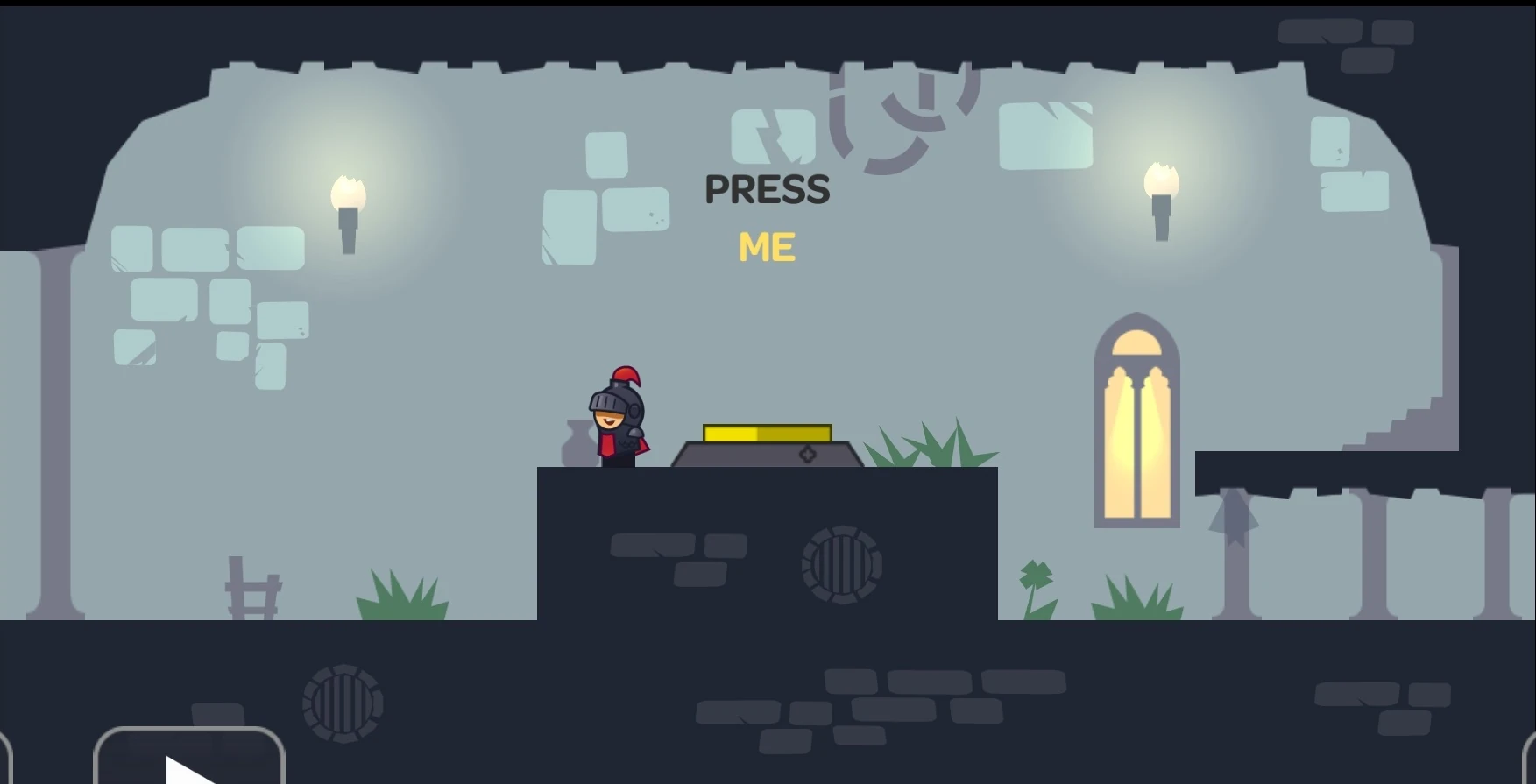
Tricky Castle room numbers can change between Android and iOS releases. Before following this Tricky Castle Level 44 guide, match the gameplay screenshot, room layout and puzzle clue to your version.
Tricky Castle Level 44 walkthroughs & guide
Below is a comprehensive walkthrough for Tricky Castle Level 44, covering the complete route from the opening position to the exit. The main challenge in Tricky Castle Level 44 is learning how to tap the word ME instead of the physical button while avoiding the trick built into the room. Follow the steps in order, check the visible response after each action and use the screenshot above to confirm that you are on the same version of the level.
Tricky Castle Level 44 quick answer: Read “PRESS ME” literally and tap the yellow word ME on the wall; the text itself is the real control that opens the exit.
Step 1. Ignore the large yellow floor button
In Tricky Castle Level 44, the obvious button beside the knight is intentional misdirection. Standing on it or pressing it does not satisfy the instruction. Look above the character at the words “PRESS ME,” especially the yellow ME that is colored like a button and separated from the black word above.
Step 2. Tap the yellow word ME directly
In Tricky Castle Level 44, place a finger on the letters ME and tap once. The text is an interactive object in Tricky Castle Level 44. You do not need to move the knight onto the wall or jump toward the clue; a direct screen touch triggers the solution and changes the state of the exit.
Step 3. Enter the unlocked door
In Tricky Castle Level 44, wait for the text tap to register and confirm that the bright doorway becomes available. Walk the knight across the platform and enter it. If nothing changes, tap the center of the yellow letters rather than the surrounding wall or the word PRESS.
Notes and Precautions
- 1. The clue text contains the actual interactive control in this room.
- 2. Only the yellow word ME needs to be tapped.
- 3. The large floor button is a decoy.
- 4. A direct finger touch works without moving the knight to the letters.
Tips and Tricks
- 1. Tap the middle of the yellow M and E area.
- 2. Wait a moment for the exit state to update.
- 3. Ignore repeated attempts on the floor button.
- 4. Collect the room’s bats before walking through the unlocked door.
Tricky Castle Level 44 collectibles and secrets
For Tricky Castle Level 44, the bats in Tricky Castle Level 44 are positioned along the room’s ordinary route. Collect them before entering the door, after the word ME has unlocked it. The physical yellow button is not needed for the bat search or the main solution, so do not spend time trying different character positions on top of it. Once the doorway glows, sweep the left and right ledges at a relaxed pace and confirm the counter before stepping through the bright threshold.
By following these steps in sequence, you can finish Tricky Castle Level 44 without relying on random movement or unnecessary interactions. Remember that the defining puzzle in Tricky Castle Level 44 is to tap the word ME instead of the physical button. If your room looks different, compare the screenshot and video before retrying because your game version may use another level number.
Tricky Castle Level 44 walkthrough video
Tricky Castle Level 44 walkthrough by PRAMONEZ LOMBOK. The video opens directly on this level.
Tricky Castle Level 44 video walkthrough and solution
This Tricky Castle Level 44 walkthrough video shows the complete verified route from the opening position to the exit. Watch how the player handles the room’s main trick—tap the word ME instead of the physical button—then use the written checkpoints below if you need to repeat only one part of the solution. The dedicated Tricky Castle Level 44 video solution is especially useful for jump timing, moving hazards and interactions that are easier to recognize in motion.
Tricky Castle Level 44 video quick answer: Read “PRESS ME” literally and tap the yellow word ME on the wall; the text itself is the real control that opens the exit.
What to watch for in the Tricky Castle Level 44 walkthrough video
Before copying the movement, compare the room layout in the video with your game. Tricky Castle numbering can differ between Android and iOS builds, so the visual arrangement and puzzle clue are more reliable than the number alone. When the room matches, play the Tricky Castle Level 44 walkthrough video once at normal speed to understand the full idea, then replay the exact action that is causing trouble.
Video checkpoint 1: Ignore the large yellow floor button
At this point in the Tricky Castle Level 44 video walkthrough, the obvious button beside the knight is intentional misdirection. Standing on it or pressing it does not satisfy the instruction. Look above the character at the words “PRESS ME,” especially the yellow ME that is colored like a button and separated from the black word above. Watch the character, nearby hazards and any object that changes after the action; that visual response confirms that you can move to the next checkpoint.
Video checkpoint 2: Tap the yellow word ME directly
At this point in the Tricky Castle Level 44 video walkthrough, place a finger on the letters ME and tap once. The text is an interactive object in Tricky Castle Level 44. You do not need to move the knight onto the wall or jump toward the clue; a direct screen touch triggers the solution and changes the state of the exit. Watch the character, nearby hazards and any object that changes after the action; that visual response confirms that you can move to the next checkpoint.
Video checkpoint 3: Enter the unlocked door
At this point in the Tricky Castle Level 44 video walkthrough, wait for the text tap to register and confirm that the bright doorway becomes available. Walk the knight across the platform and enter it. If nothing changes, tap the center of the yellow letters rather than the surrounding wall or the word PRESS. Watch the character, nearby hazards and any object that changes after the action; that visual response confirms that you can move to the next checkpoint.
Tricky Castle Level 44 video notes and precautions
The video route is a demonstration of one clean completion, not a signal to rush. Pause before any precise jump or timed interaction and compare the player’s starting position with yours. In Tricky Castle Level 44, a small difference in spacing can change when a trap activates.
- 1. The clue text contains the actual interactive control in this room.
- 2. Only the yellow word ME needs to be tapped.
- 3. The large floor button is a decoy.
- 4. A direct finger touch works without moving the knight to the letters.
Tips for following the Tricky Castle Level 44 video solution
- 1. Tap the middle of the yellow M and E area.
- 2. Wait a moment for the exit state to update.
- 3. Ignore repeated attempts on the floor button.
- 4. Collect the room’s bats before walking through the unlocked door.
Collectibles shown around Tricky Castle Level 44
After learning the escape route from the Tricky Castle Level 44 walkthrough video, replay the room for optional items if needed. the bats in Tricky Castle Level 44 are positioned along the room’s ordinary route. Collect them before entering the door, after the word ME has unlocked it. The physical yellow button is not needed for the bat search or the main solution, so do not spend time trying different character positions on top of it. Once the doorway glows, sweep the left and right ledges at a relaxed pace and confirm the counter before stepping through the bright threshold. A separate collectible run is often safer than trying to combine every secret with the first successful exit.
Finish Tricky Castle Level 44 with the video
The important lesson in this Tricky Castle Level 44 video guide is to reproduce the order of actions, not merely the final movement. Confirm each switch, platform or hazard response before continuing. If your screen still does not match, return to the screenshot on the Cheats & Solution tab and locate the guide whose room layout matches your version.