
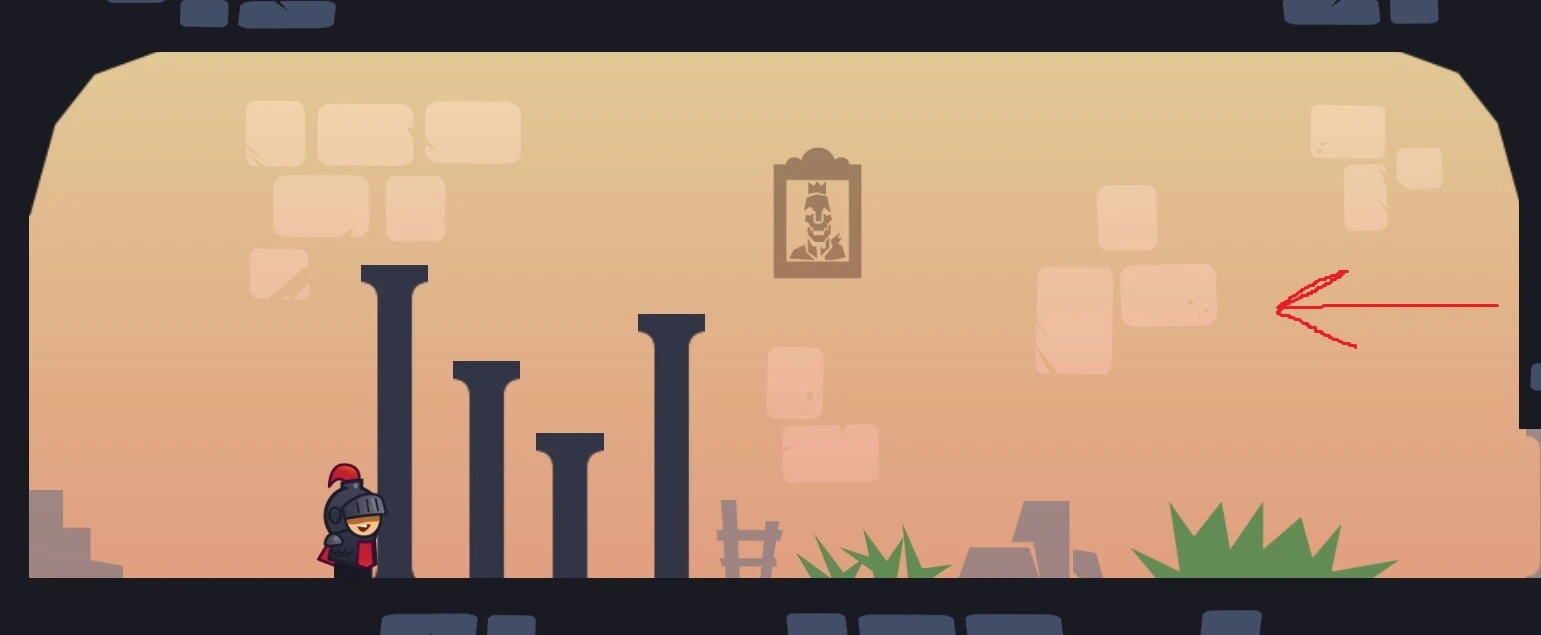
Tricky Castle room numbers can change between Android and iOS releases. Before following this Tricky Castle Level 15 guide, match the gameplay screenshot, room layout and puzzle clue to your version.
Tricky Castle Level 15 walkthroughs & guide
Below is a comprehensive walkthrough for Tricky Castle Level 15, covering the complete route from the opening position to the exit. The main challenge in Tricky Castle Level 15 is learning how to swipe the background twice to remove the barriers while avoiding the trick built into the room. Follow the steps in order, check the visible response after each action and use the screenshot above to confirm that you are on the same version of the level.
Tricky Castle Level 15 quick answer: Swipe across the interior background two times until the pillars blend into the scenery, then walk through the cleared path to the exit.
Step 1. Swipe across the interior background
In Tricky Castle Level 15, place a finger on the open colored wall area inside the room, avoiding the solid outer border and the movement controls. Swipe horizontally to cycle the background. The tall dark pillars initially look like physical obstacles, but the clue says that the background does not fit, indicating the scenery layer must be changed.
Step 2. Repeat the swipe a second time
In Tricky Castle Level 15, perform the same background swipe again. After two changes, the scene reaches the correct version and the apparent barriers become part of the background art instead of solid collision objects. Watch the pillar appearance after each swipe so you stop on the state described by the message “And now it’s just right.”
Step 3. Walk through the former barriers
In Tricky Castle Level 15, switch back to the normal controls and move the knight to the right. Pass directly through the pillars that blocked the route before the background was corrected, then continue to the exit. If collision still stops the knight, make another careful swipe on the interior wall and verify that exactly two background changes registered.
Notes and Precautions
- 1. Swipe the room background, not the black outer walls or control buttons.
- 2. Two successful background changes are required.
- 3. The pillars only become passable in the matching final background state.
- 4. No key or hidden lever is needed once the scenery is corrected.
Tips and Tricks
- 1. Use a long, deliberate swipe through an empty part of the wall.
- 2. Pause after each gesture and watch the color and pillar state change.
- 3. Test the first barrier only after the second swipe has completed.
- 4. If the screen does not change, start the gesture farther from the knight and controls.
Tricky Castle Level 15 collectibles and secrets
For Tricky Castle Level 15, there are no bats in this level. The two background swipes and the unobstructed walk to the exit form the complete route. You do not need to inspect the pillars individually or search behind them after they become scenery, because the corrected background removes every required collision obstacle at once.
By following these steps in sequence, you can finish Tricky Castle Level 15 without relying on random movement or unnecessary interactions. Remember that the defining puzzle in Tricky Castle Level 15 is to swipe the background twice to remove the barriers. If your room looks different, compare the screenshot and video before retrying because your game version may use another level number.
Tricky Castle Level 15 walkthrough video
Tricky Castle Level 15 walkthrough by PRAMONEZ LOMBOK. The video opens directly on this level.
Tricky Castle Level 15 video walkthrough and solution
This Tricky Castle Level 15 walkthrough video shows the complete verified route from the opening position to the exit. Watch how the player handles the room’s main trick—swipe the background twice to remove the barriers—then use the written checkpoints below if you need to repeat only one part of the solution. The dedicated Tricky Castle Level 15 video solution is especially useful for jump timing, moving hazards and interactions that are easier to recognize in motion.
Tricky Castle Level 15 video quick answer: Swipe across the interior background two times until the pillars blend into the scenery, then walk through the cleared path to the exit.
What to watch for in the Tricky Castle Level 15 walkthrough video
Before copying the movement, compare the room layout in the video with your game. Tricky Castle numbering can differ between Android and iOS builds, so the visual arrangement and puzzle clue are more reliable than the number alone. When the room matches, play the Tricky Castle Level 15 walkthrough video once at normal speed to understand the full idea, then replay the exact action that is causing trouble.
Video checkpoint 1: Swipe across the interior background
At this point in the Tricky Castle Level 15 video walkthrough, place a finger on the open colored wall area inside the room, avoiding the solid outer border and the movement controls. Swipe horizontally to cycle the background. The tall dark pillars initially look like physical obstacles, but the clue says that the background does not fit, indicating the scenery layer must be changed. Watch the character, nearby hazards and any object that changes after the action; that visual response confirms that you can move to the next checkpoint.
Video checkpoint 2: Repeat the swipe a second time
At this point in the Tricky Castle Level 15 video walkthrough, perform the same background swipe again. After two changes, the scene reaches the correct version and the apparent barriers become part of the background art instead of solid collision objects. Watch the pillar appearance after each swipe so you stop on the state described by the message “And now it’s just right.” Watch the character, nearby hazards and any object that changes after the action; that visual response confirms that you can move to the next checkpoint.
Video checkpoint 3: Walk through the former barriers
At this point in the Tricky Castle Level 15 video walkthrough, switch back to the normal controls and move the knight to the right. Pass directly through the pillars that blocked the route before the background was corrected, then continue to the exit. If collision still stops the knight, make another careful swipe on the interior wall and verify that exactly two background changes registered. Watch the character, nearby hazards and any object that changes after the action; that visual response confirms that you can move to the next checkpoint.
Tricky Castle Level 15 video notes and precautions
The video route is a demonstration of one clean completion, not a signal to rush. Pause before any precise jump or timed interaction and compare the player’s starting position with yours. In Tricky Castle Level 15, a small difference in spacing can change when a trap activates.
- 1. Swipe the room background, not the black outer walls or control buttons.
- 2. Two successful background changes are required.
- 3. The pillars only become passable in the matching final background state.
- 4. No key or hidden lever is needed once the scenery is corrected.
Tips for following the Tricky Castle Level 15 video solution
- 1. Use a long, deliberate swipe through an empty part of the wall.
- 2. Pause after each gesture and watch the color and pillar state change.
- 3. Test the first barrier only after the second swipe has completed.
- 4. If the screen does not change, start the gesture farther from the knight and controls.
Collectibles shown around Tricky Castle Level 15
After learning the escape route from the Tricky Castle Level 15 walkthrough video, replay the room for optional items if needed. there are no bats in this level. The two background swipes and the unobstructed walk to the exit form the complete route. You do not need to inspect the pillars individually or search behind them after they become scenery, because the corrected background removes every required collision obstacle at once. A separate collectible run is often safer than trying to combine every secret with the first successful exit.
Finish Tricky Castle Level 15 with the video
The important lesson in this Tricky Castle Level 15 video guide is to reproduce the order of actions, not merely the final movement. Confirm each switch, platform or hazard response before continuing. If your screen still does not match, return to the screenshot on the Cheats & Solution tab and locate the guide whose room layout matches your version.